
Should we do phoneme awareness activities without letters?
19 Replies
If you subscribe to Developmental Disorders of Language and Literacy (DDOLL) emails, you’ll know there’s been a recent storm of professional discussion about whether it’s a waste of time doing phonemic awareness activities without letters.
The strong consensus is that it’s preferable to use letters/spellings when working on phonemic awareness (though it then also becomes a phonics activity). This has been clear for a long time. I recently reread Diane McGuinness’s classic 2004 book Early Reading Instruction: What Science Really Tells Us About How To Teach Reading, which says:
One of the most consistent findings in the literature…and evident in the NRP’s meta-analysis, is that when phoneme-awareness training is meshed with teaching letter-sound correspondences, this has a much stronger impact on reading and spelling than training in the auditory mode alone.”
p 166. the NRP is the 2000 US National Reading Panel, which did a huge review of scientific evidence on how to teach reading).
My favourite activity for teaching phonemic awareness is building and changing words/creating word sequences using my moveable alphabet. Here’s how I use it:
However, Diane McGuinness doesn’t say phonemic awareness activities without letters are a complete waste of time, and nor did the NRP.
While waiting outside a hall, pool or at a bus stop, is it worth doing a few oral-only Equipped for Reading Success or Heggerty deletions/manipulations if you have a photocopy of relevant ones in your bag, or a screenshot on your phone? Could you play I Spy Blending, using phoneme strings as clues instead of first letter names, while going for a walk, like this?
I’d love adults and four-year-olds to play I Spy Blending while travelling, waiting, doing mundane housework or otherwise needing something to amuse themselves. The adult would ask all the questions and stick to words with just two or three sounds before introducing longer words. Once a child is proficient at answering (blending), they might like to try asking some questions (segmenting), perhaps on a team with an adult at first.
Imagine if most children arrived at school knowing how to play this game, and could take turns to both ask and answer. That would be a sign that they had already nailed the two most basic phonemic awareness skills: blending and segmenting. They’d be perfectly positioned to learn how sounds in spoken words are written using letters.
It’s important to remember that different approaches can work for different groups. While Diane McGuinness was adamant that there’s no benefit in adding oral phonemic awareness activities to a good linguistic phonics program for mainstream learners, she did see a role for these activities in intervention, using tokens/tiles:
There is, however, a good argument for special training in phoneme awareness in the clinic. Poor readers have extremely maladaptive decoding strategies, guessing whole words from first letters only, assembling little word parts into something like a word, or refusing to read altogether. An ineffective decoding strategy leads to habits that can be hard to break. It is almost a given that these children (or adults) have few or no phoneme-analysis skills. Because print can be aversive, causing anxiety and even panic, initial phoneme-awareness training is more effective in the auditory mode than using blank tiles. A three-step process is necessary: developing phoneme awareness with blank markers, learning phoneme-grapheme correspondences, and reading simple (easily decodable) text.
McGuinness, Diane (2004) Early Reading Instruction: What Science Really Tells Us About How To Teach Reading, MIT Press, Cambridge, Massachusetts and London, England, p 328.
More research on this would be very interesting and valuable.
Top 10 online PA/phonics resources/activities
23 Replies200+ days in COVID-19 lockdown and no clear end in sight, so I’m scratching around for fresh ways to target phonemic awareness, phonics and morphology online. Maybe you are too. Here are some things I was SO GRATEFUL to find. A million thanks to their creators. Please add your favourite resources and ideas in the comments.
- Wordwall


I think my head would have imploded in the last 18 months without a Wordwall subscription (AUD$12 a month for all the games). I’ve made lots of activities which you can use for free, and so have many others.
Only the crossword, hangman, spell the word and anagram games require spelling rather than reading to play, but not to create. I therefore get kids to help me create a game online: first choose a game, type the target words/sentences into it, then play the game, then go on the leader board. Playing the game again can be part of the homework, either on a computer or as a printable crossword or word search. It’s also possible to make little moveable alphabet/sound swap activities in the word magnets activity.
2. Phonic Books Moon Dogs At Home books and other resources

We use the physical Phonic Books resources a lot, and have found their free online resources very useful during our lockdowns. So generous, and so relevant. A lot of the WordWalls we’ve created also match their books’ teaching sequences.

Flyleaf’s Online Portal contains lots of cute books from the UK which are perfect for online use, and all free at present, because of the pandemic. Again, so generous! Jen’s Best Gift Ever is my favourite, click here to read it, and here’s a comprehension quiz I’ve made as a follow-up activity (use it as a Gameshow Quiz for more pizazz).
4. ICT Games

ICT games are all free online, and a quick, fun way to warm up or finish off a session. I often ask kids to type their own lists into Help A Hedgehog, then see how many they can read before the 90 second timer runs out. Other favourites are Tell A T-Rex, Poop Deck Pirates, Viking Full Circle, Forest Phonics, and Phonics Finder. This site runs on a donation model because the husband-and-wife team behind it think no child should be prevented from learning by lack of money. So if you can afford to donate, please do.
5. Sounds Write Practitioners’ Portal and freebies
All of us at Spelfabet have trained in the linguistic/synthetic phonics program Sounds-Write, so we have access to the Sounds Write practitioners’ portal, which has heaps of ready-to-use activities following their teaching sequence. There is also a facebook page where Australian and NZ Sounds-Write practitioners share ideas and resources.
Sounds-Write also have quite a few free resources which can be used online such as decodable books.
6. Little Learners Love Literacy apps and other resources

The app versions of the lovely LLLL books have been a great way to show young clients the books, by sharing the iPad screen online. These books were made available free during the COVID lockdowns. Lots of paper-based LLLL activities also lend themselves to online use, see item 8 below. If you’re working online on Zoom, you can share your iPad/iPhone screen online (either with bluetooth or plug it into your computer), but kids can only see it, not operate it (unless I am missing something). That means they can read whatever decodable texts you have on your iPhone/iPad.
Not sure whether this works on online platforms beyond Zoom, or whether you can share Android screens, sorry. The internet will probably be able to tell you, with videos, if it is possible.
7. Powerpoint versions of decodable texts

Some kids with good keyboarding skills like typing a simple story to dictation, to create a book they can then show a parent or teacher. I’ve used some Phonics With Feeling books for this, with author permission. I take screenshots of the pictures and paste them onto slides, type the text, then use Powerpoint’s formatting suggestions to make it look more schmick. Then I save it, delete the text and save it again under a different file name. Voila! A simple onscreen reading then spelling activity with large text.
8. Adobe Acrobat Reader editing tools
We use Zoom and it has been excellent, but I rarely use their whiteboard or editing tools. The free Adobe Acrobat editing tools work much better with pdfs. You can scroll through homework and cover it in ticks. You or the learner can type, change the font size and colour, and move text around. You can underline or put boxes around target words in sound searches (we play a guess-how-many-jellybeans-in-the-jar game with these, first guessing how many words with the target sound there will be). I just wish I could turn off the predictive text! (any ideas? I’ve tried everything!)

You can also play games (like the one above from Nicole Brady) using big dots as counters. Sounds-Write, Phonic Books and Little Learners Love Literacy books all have paper-based games that can be scanned as pdfs and used this way, and there are digital versions of the LLLL books. I use the iPad or iPhone app Make Dice held up to the camera for dice games, as I’m rubbish at online dice (all tips gratefully received). Make Dice can also replace the spinner for the Phonic Books Spin, Read and Spell games.
9. Kahoot!

I’m sad to say that I’ve only recently figured out that Kahoot! can motivate many kids to do quite a lot of reading. The best music teacher in the world (hi Roz!) told me it had revolutionised her lessons. Kids are often familiar with it from school, and think it’s fun and cool. We’re writing some downloadable quizzes now which should be easy to turn into Kahoot!s.
10. Jamboard is no longer available in 2025, Really Great Reading has letter tiles worth checking out, but I am still working out how their subscription works.
Google’s Jamboard was another useful tool I wish I’d discovered earlier. It was like an online whiteboard with colourful post-it notes, from which I made simplified versions of my moveable alphabet for word-building sequences, e.g. here the learner would be asked to change “stitch” into “switch”:

Kids tend not to stretch or rotate the tiles the way they have in other formats I’ve tried using for this activity. Jamboard was also a quick way to create neat word sorting activities:

I got words for these sorts from my website’s sorted-by-sound lists (for same-sound-different-spellings activities) or sorted-by-spelling lists (for same-spelling-different sounds activities).
I hope you found some useful information in all that, especially if you’re still working online too. Pretty please leave any great ideas you have to share in the comments.
2025 extra thoughts: There are lots of free, downloadable decodable texts on the Freereading website, and the Preschool University website also has affordable digital materials including decodable texts. Great for dictation, as the learner can read the text on screen and think about anything that might be tricky in it before starting to write/type.
If the learner has a parent/support person with a phone with a camera and a different email address from the one the learner is using to sign in to the Zoom, they can also join the Zoom from their phone and use it as a document camera. This allows you to see what the learner is writing. The phone can be inserted near the top of a stack of books, cans of beans, whatever, with the lens sticking out, and then the learner’s paper/whiteboard can be placed under the lens and the camera focussed/adjusted as necessary.
January 2021 holiday groups
0 Replies In the week of January 11-15 2021 we will be running some phonemic awareness and phonics/spelling small groups at the Spelfabet office in North Fitzroy. The groups are for struggling readers/spellers who will be going into Grade 1 or 2 next year.
The groups will be staffed by Speech Pathologists Tessa Weadman, Adrianna Galioto (pictured above, though you can’t really see how smiley and nice they are under their masks) and myself, Alison Clarke.
We’re all trained in the program Sounds-Write and will use it in the groups, as well as playing some phonemic awareness/phonics games. We’ll provide home readers and about 30 minutes of homework each day, leaving plenty of time for swimming and other holiday fun.

Each group will run for an hour, with a maximum of three children per Speech Pathologist, which means each child will receive five hours of intensive intervention. The cost will be $450 per child for the week of sessions. Many private health insurance companies provide rebates for group therapy.
The sessions will run as follows:
- 9:00am-10:00am targeting children who have done a year of schooling, but are still struggling to blend and segment and thus can’t reliably read or spell words with two or three sounds and simple spellings like “at”, “fun” and “hop”.
- 11.00-12.00pm targeting children going into Grade 1 or 2 who can blend and segment a little, and reliably read and spell two and three-sound words like “at”, “fun” and “hop”, but struggle with words with four or five sounds like “jump”, “stop” and “frog”.
- 1: 00- 2: 00pm targeting children going into Grade 1 or 2 who can can read and spell words containing four or five sounds, but struggle with words containing consonant digraphs like “sh”, “ch”, “th”, “ck” and “ng”.

Children who are not already on our caseload will need to come in for an initial assessment ($190) first, so that we can be sure they are a good fit for one of the groups.
We hope our state’s COVID-19 double doughnut days (no new cases, no deaths) continue through January, and that our groups will be a fun way to boost struggling learners’ skills before they go back to school. We will always comply with Speech Pathology Australia COVID-19 safe guidelines.
Please contact our excellent office coordinator, Renee Vlahos on 03 8528 0138 or renee.vlahos@spelfabet.com.au if you’d like more information, or to express interest in enrolling a child in one of the groups. Renee goes on leave on 18/12/20, so if you’d like to check whether group places are still available after that please email info@spelfabet.com.au.
Phonics stocking stuffer
8 Replies
It’s the first day of summer here in Melbourne, after a long, hard year of lockdown. We’ve been mostly working online since March, which was quite a learning curve, so I’ve had almost no energy for blogging or the website (sorry). We’ve now had no new COVID-19 cases for a month (hooray! it can be done!) so are cautiously looking forward to the silly season.
If you’d like a simple, inexpensive phonics game as an end-of-year school activity or Christmas stocking stuffer, you might like my new printed (no laminating or cutting up required!) word-building card game. Lots of kids didn’t learn very well this year thanks to COVID-19, but we’re all pretty weary, so it seems like a good time to build skills and knowledge through games.
Here’s a 90-second video about the game:
Children who only know one sound for each letter of the alphabet will need adult help with the sounds for the consonant digraphs and trigraphs in this game (sh, ch, th, wh, ll, ss, ck, ng, tch, dge), but children who know these spellings can play more independently.
If a child builds a word they don’t know, you might like to tell them what it means and put it in a sentence or two, to build their vocabulary, or just skip over it if it’s not a common word.
Older/more advanced learners can put up to three adjacent consonants in their first words (e.g. bench, truck, splint and strengths), which are then much harder for their opponent to change. Knowing the consonant combinations used in English syllables helps with spelling and reading.
The game – 52 child-sized cards and 2 instruction cards in a box – costs $12 including GST from our online shop, plus $9.20 for packing and postage to anywhere in Australia, or you can click-and-collect from our office in North Fitzroy. Please ring first (03 8528 0138) to make sure our reception will be staffed when you visit, and it won’t be waiting room Peak Minute.
Sorry we can’t currently ship this game overseas. The DSF online shop also sells this game, and may take overseas orders. You can also get this game from the lovely people at Childplay toy shop in Clifton Hill, where I never fail to find the best gifts for kids.
The download-and-print version of this game is also still available, either by itself or in a set of three games, but you have to provide the cardboard and colour printer, laminate it and cut it up, and the end result isn’t as robust or professional-looking.
An earlier version of this game contained spellings like ‘v’, ‘j’, ‘ff’ and ‘zz’ which aren’t in many words, so that version was a bit harder to play. These spellings have been replaced by more common ones in the new game, so it’s easier and more fun for beginners and strugglers. I’m hoping to be able to produce more printed resources in future, if these cards are a success.
Is Reading Eggs all it’s cracked up to be? (boom tish)
26 Replies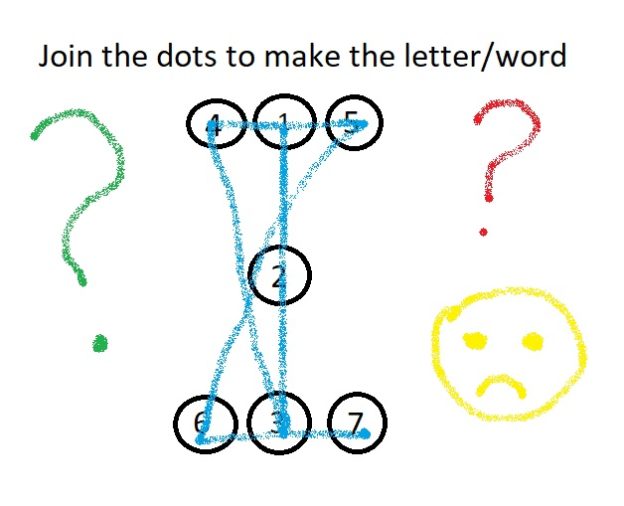
After my last blog post about the new Reading Eggs – Fast Phonics program, its activity that looked exactly like a Nessy activity suddenly got new graphics. Then someone asked me why I’m not a fan of the original Reading Eggs program when it includes a lot of phonics, so I decided to take another look.
With hundreds of new COVID-19 cases daily (yeek) and a new face-masks-in-public rule, my state is heading back into another protracted period of home-based learning, probably including lots of e-learning. I want children to use programs that maximise their chances of successfully learning to read and spell.
Is Reading Eggs from the ABC?
I used to think that Reading Eggs was owned by the Australian Broadcasting Commission, because it uses the ABC logo.
Incorrect. Reading Eggs is owned by a company called Blake e-learning. It uses the trusted ABC name and logo in Australia under a retail partnership with ABC Commercial. The Reading Eggs site visible outside Australia, https://readingeggs.com, has no ABC logo (it quickly redirects Australians to the Australian site).
The ABC Commercial website says, “As an iconic, trusted brand, we are the only Australian distributor equipped to maximise the rights and opportunities across all product categories to help drive your business.” As a member of Friends of the ABC I was pretty surprised at that.
How should early reading and spelling be taught?
Beginning readers/spellers need be told from the very start that spoken words are made of sounds, which we write with letters. This seems obvious to literate adults, but is not at all obvious to young children, or many older learners. I once told a smart, illiterate teenager who’d had ten years of Australian schooling this fact, and he asked: “Why didn’t anyone tell me that?” (if you don’t know why, read journalist Emily Hanford’s reports or watch/listen to her recent PATTAN network talk here).
The sounds in our speech are invisible, quick and smoosh into each other, so splitting them up in order to spell them is hard. English is a mishmash of languages, warped over time (the wonderfully nerdy History of English podcast has details), so our writing system relates 44 speech sounds to 26 letters using five different types of logic:
- One sound can be written with one letter.
- One sound can be written with two, three or four letters e.g. sh, ou, dge, augh.
- Most sounds are written more than one way e.g. out, cow, drought.
- Some spellings represent more than one sound e.g. out, you, touch, cough, soul.
- Meaningful parts used to build longer words often have special spellings e.g. er, ed, ly, al, est, ous, chron.
Reading and spelling software for young beginners should stick to the simplest logic (#1). It should focus on teaching children to break up spoken words into sounds and write them with letters, and read words by saying a sound for each letter then blending the sounds together.
Like all good systematic, explicit, synthetic phonics programs (see examples) this software should start with just three to five sounds, represent them with single letters, and teach kids to use them to spell and read little words e.g. am, at, it, sat, sit, sis, mat and perhaps names like Sam, Sim, Tam and Tim.
Note that the words “is” and “as” don’t follow logic #1, as their last sound is /z/ (logic #4). Including them might confuse some children and undermine logic #1, so if they’re included they should be explained e.g. “at the end of words we often say /z/ for this letter”.
Extra sounds and their spellings should then be gradually, explicitly, systematically introduced and practised to mastery in short words (two or three sounds). Words can then be made longer e.g. with two consonants together as in “clip” and “tent”, then three as in “split” and “helps”, as consonant combinations can be quite hard to segment and blend.
This gives beginners a solid foundation for learning the additional sounds and remaining logic and patterns of our complex spelling system.
How does Reading Eggs stack up?
Reading Eggs offers a free trial period, so anyone can sign in and see the following things for themselves. It first introduces “the sound m, like in mouse” and presents the lower case letter m for children to click on to hear /m/ (I’ll put sounds in slash marks). There’s just letter m at first, and then children must discriminate it from two other letters. There’s no need to link sounds and letters in this activity, so it can be done using visual memory (not the kind of memory used in reading, see this blog post).
The program then asks “which picture starts with the /m/ sound?” and there are two pictures on screens e.g. “moss” and “sat”. I pretended to be a child without any awareness of sounds in words, and answered randomly. When I got it wrong, there was a “boing” sound with zigzags on the screens and I was told to “try again”. When I got it right, a cartoon character said a (less interesting) “yes”. No matter how many times I got it wrong, no help was offered. Eventually, thanks to having a 50-50 chance, I fluked it and went up to the next level.
I was then asked to “find /m/ in these words”, and printed words containing the letter “m” appeared the screen, but the words were not spoken, so again visual memory was all I needed. The words included digraphs (“moon”), split vowel digraphs (“time”) and two-syllable words (“metal”), examples of spelling logic #2 and #4.
When I clicked randomly I was told to “try again” till I eventually fluked enough correct answers. There was a song about words with “m” in them. The words flashed on screens with the letter m in a contrasting colour. To preliterate children, they probably look like chicken scratchings.
Next I was told to “complete the dot to dot to make the letter”, and there were numbered dots on the screen in roughly this layout:

I pretended I hadn’t learnt my numbers yet, and clicked randomly. I got three “boing” sounds and three red crosses on the screen, and then was asked “again?”. This happened no matter how many times I got it wrong. When I clicked on the dots in numerical order, the lower case letter “m” was filled in between the dots, and I was asked to do it faster. I hope a handwriting expert can tell us in the comments whether this sort of numbered-dot-clicking is a good way to teach early letter formation.
Next came a 6×6 letter grid with six copies of the letter “m” in it, in slightly different fonts, and including visually similar letters like “n”, “h” and “w”. I was told to click on /m/. When I made mistakes I got red crosses and “boing” sounds, and after three errors was asked “again?”, but the game did not adjust to my confusion by reducing the number of choices, providing hints or otherwise helping me.
I was then shown a letter “m” and told “This is the letter em, it makes the sound /m/’. Capital em looks like this (M), it also makes the sound /m/”. Preliterate me wondered why we have two letters for the same sound, but this wasn’t explained. A 6X6 grid like the previous one appeared, this time with capital letters, and again if I couldn’t find the M’s, the task was not simplified, I just went round and round being asked “again?” till I fluked it.
Next I was shown a letter “m” in a book and asked to click on the picture that begins with /m/. With only two pictures presented at a time, I had a 50-50 chance. The picture names were not spoken unless I clicked on the speakers next to them, and when I made three mistakes I had to go back to the start. There was no slowing down or stretching out of spoken words, or other explicit assistance with making the connection between the sound in words and the letter.
Next I was shown a screen arranged like this, and asked to drag the words to the pictures:

So far in this program kids have only learnt one letter, so can’t read the words, but that doesn’t matter because you just click on the words and they’re spoken, so all you need to do is match spoken words to pictures. You can just ignore the written words, and since reading them requires logic #2 (moon, mess, mice) and #3 (/s/ as in mess, mice), probably that’s a good thing.
Next there was a book with a different word starting with “m” on each page, including words with vowel and consonant digraphs, consonant blends and two syllables, and a total of 15 different sound-spelling relationships, some based on logic #2 (ey as in monkey and money, oo as in moon, ou and se as in mouse) and logic #4 (o as in money, monkey, mop; n as in man, monkey).
This type of book teaches preliterate kids to “read” by looking at first letters, pictures and guessing words. This is reading-like behaviour, but should never be confused with reading. So far only one sound has been taught, so kids aren’t yet equipped to start reading.
Next, the sound /s/ and letter “s” are introduced in much the same format. There is letter identification and matching, spoken word to picture matching (including the three-syllable word “spaghetti”), and a book about “s” with 23 different sound-spelling relationships involving logic #1, #2, #3 and #4.
In the third level I am invited to “Click on the word I” (my italics) and the capital letter “I” appears, first by itself and then with two other capital letters. Then I’m told I’ll be shown “the sound ‘am’ like in ‘clam'” (my italics). So this activity introduces two extra levels of word analysis – rimes (mislabeled sounds) and whole words. Preliterate me wondered why “I” is called a word, when it has only one letter, while “am” is called a sound, when it has two letters.
Next I was told to click on “am”, first by itself and then with distractor items like “xi” and “lu” on bowls of sugar cubes (Reading Eggs has also offered me cakes and marshmallows, so it’s not from the I Quit Sugar brigade).
Then I am asked to “click on the picture which has the am sound in it”, and pictures offered include “dam”, “ham” (which lots of people don’t eat), “lamb” and “stamp” (the latter being especially hard for little kids to discern the “am sound” in, as it’s not at the start or end of the word).
Then I’m shown the sentence “I am Sam” and asked to click on each word, after which the words are scrambled and I am asked to click on them again. Then I’m asked to “complete the dot to dot to make the letter”, though it doesn’t say which letter. It turns out to be a capital I. Preliterate me wonders why they’re now calling it a letter, not a word.

So far, Reading Eggs seems to be a mixture of initial, letter-of-the-week type phonics, picture-guessing and memorising whole words. In the next activity I’m asked to “say each sound and make the word” and shown how to blend “a” and “m” into “am”. This happens once only, and then I’m told “now it’s your turn”, and the visuals repeat, but not the sounds. The same thing happens for the word “Sam”. Then “a” and “s” (/s/) are blended to make “as” pronounced /az/. Nobody explains the sound change.
Next, lower case letter i is given its letter name (“I”), which you’ll recall was earlier taught as the “word” for upper case letter I. I’m asked to find six of them in a grid, but when I get to the grid I’m told to “click on /i/” (the “short” sound).
Sorry, but I really can’t justify spending any more of my time looking at a program that I am not going to recommend to anyone.
If you’d like my recommendations for early literacy iPad apps for little kids, see this blog post. Several of them have versions on other platforms, including Graphogame, Phonics Hero, Nessy and Reading Doctor.
Top early literacy apps 2020
37 Replies
Most young children are already using apps on phones or tablets, at least occasionally. Whatever you think of kids’ screen time, we want it to be quality time. There’s some evidence that interactive apps support early academic development, but finding quality early literacy apps can be difficult and time-consuming. Lots of early literacy apps are (IMHO) simply rubbish.
It’s helpful to read adult reviews of apps for children, but to really road-test an app, I like to watch a young child using it. My colleague Caitlin Stephenson and I have thus filmed Harrison (aged 4, nearly 5) trying out some of my favourite early phonemic awareness and phonics iPad apps for young children.
The resulting video is below. We hope it gives you a taste of how each app works, to help you decide whether it would suit the small person/people in your life. The video is 16 minutes long, and the apps tried are listed below (numbers in brackets are start times on the video clock):
- Graphogame (0:06)
- Phonics Hero (1:50)
- Hairy Letters from Nessy (3:26)
- Bob Books Reading Magic 1 (5:00)
- Reading Raven (6:25)
- Reading Doctor Letter Sounds 1 Pro (8:32)
- Cake Shop Letters (or if you prefer, Spooky Letters or Dinosaur Letters) (10:10)
- Initial Code from Sounds-Write (full version is here) (11:37)
- Wordchain 1 (13:04) which in 2024 is a web-based program not an iPad app.
- Phonics Read CVC 100 Words by Joe Scrivens (14:36) which in 2024 seems to be unavailable, but CVC Phonics Spelling Practice by the same person is good, and still available.
The only tablet I have is an iPad, but some of these apps are available for other platforms. Many also work on iPhones. Please note that my app store links are to the Australian store, so if you’re elsewhere, you’ll have to search your local apps store for these apps.
I’m not quoting prices here because they often change, plus some apps have hundreds of activities, while some have only one/a few, so it’s a bit like comparing apples and banquets. I’ll leave the value-for-money question up to you.
Other early literacy iPad apps IMHO worth considering for young children include:
- Alphablocks Letter Fun and Meet the Alphablocks
- Atlas Mission
- Blobble Write, also available for Android
- CVC Words Short Vowel Phonics
- EBLI Reading Adventures, or see the EBLI website (US).
- Jolly Phonics Sounds Adventure, or Jolly Phonics Lessons, or for Android here.
- Let’s Read 1: Sounds, Let’s Read 1: Spelling and Let’s Read 1: Words.
- Making Words Kindergarten and First Grade
- Maria – Learn To Read
- Oz Phonics Reading Intro, Oz Phonics 1 & Oz Phonics 2.
- Phonics Bingo, Magnetic Letters & Train Phonics by Joe Scrivens.
- Phonics Flashcards & I Can Spell With Phonics
- PLD Reading Race 1a & Spellstar 1a for both Apple and Android.
- Pocket Phonics
- Reading Magic 1 & Spelling Magic 1 (and other Preschool University apps)
- Ready, Set, Read
- Read With Phonics games, also for Android, or see their website.
- Starfall Learn To Read, also for Android
- Teach Your Monster To Read
- What’s Changed?
- Word Sounds/Phonemes
- Word Wizard for Kids, also for Android
Beginners’ decodable books allow children to practice phonics skills by reading stories containing simplified spelling patterns, and some of these are also available as apps, often for both Apple & Android:
- Decodable Readers Australia
- In 2024 the Fitzroy readers are only available for Android
- Little Learners Love Literacy or for Android
- Pocket Phonics Stories
- Quackenworth Vowel Stories
- Twinkl Rhino Readers or for Android
Apologies to all the people who make good apps of which I’m not aware. I’d love to hear about them, and wish I had more time to search for and try them.
I hope this blog post helps you find apps that the small people in your life enjoy, and which help them develop great early literacy skills.
Last update: 18 June 2024
Free downloadable phonics card game
8 Replies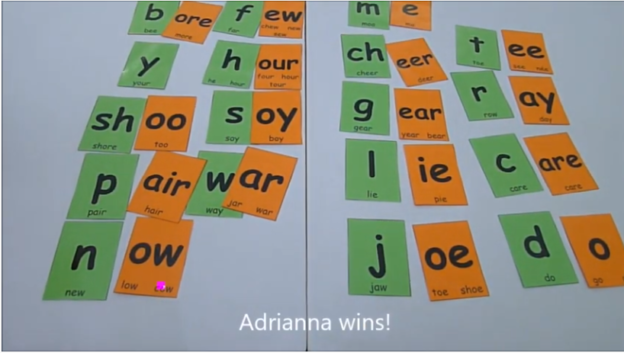
These days we all have the attention span of a gnat, so here’s a new, 60-second video about a simpler, faster way to play my free Twender word-building card game:
Setup:
- Download the game from https://www.spelfabet.com.au/materials/level-5-twender-game-comic-sans-font
- Print the consonant cards in one colour and the vowel cards in a different colour.
- Ignore the original instructions, or try playing both ways.
Play:
- Deal the two sets of cards equally.
- Race to make words with all your cards. The winner is the person who uses all their cards up first, or if nobody can do this, the person who makes the most words.
Happy New Year from all of us at Spelfabet!
 The Spelfabet shop has affordable, downloadable spelling teaching resources.
